By Epson

Epson EB-1485Fi WXGA Laser Interactive Ultra Short Throw Projector

Regular price RM19,739.00
Regular price Sale price RM19,739.00

This ultra-short-throw (UST) laser interactive projector combines short-distance projection with laser light source technology and interactive touch capability. Ideal for space-limited classrooms and meeting rooms, the laser source delivers better color accuracy, higher brightness, and quick start-up and shutdown compared to lamp-based models.

Total: MYR 19,739.00
Reference Number:Epson023
Fast Nationwide ShippingFree shipping over RM500.
100% Genuine ProductsWe only sell authentic, certified electronics.
Free Tech SupportHelp & troubleshooting 24/7
Regular price RM19,739.00
Regular price Sale price RM19,739.00
  • An ultra-short-throw laser interactive display built for classrooms and training rooms — the EB-1485Fi projects a bright, Full HD image from just centimetres away and turns it into a shared touchscreen, so teachers and students can write, annotate, and collaborate directly on the wall without a separate whiteboard.
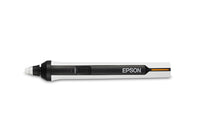
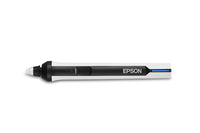
  • Dual-Pen & Finger-Touch InteractivityUp to 8 users can write, draw and interact on the screen at once using the two included interactive pens or finger touch — no software install needed on the source device.
  • Laser Light SourceUp to 20,000 hours (Normal) or 30,000 hours (Extended) of virtually maintenance-free operation, with instant on/off and no lamp to replace.
  • Ultra-Short Throw DesignSits just centimetres from the wall or screen, projecting up to 100" images without the shadows or glare caused by presenters standing in front of it.
  • Easy Interactive Tools & Whiteboard ModeAnnotate over any input source, or use the projector as a stand-alone digital whiteboard — save, print and share notes without a connected PC.
  • Full HD Image Quality5,000 lumens of colour and white brightness combine with a 3LCD engine for bright, true-to-life images even in well-lit rooms.
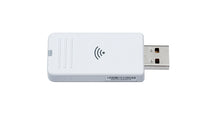
  • HDBaseT & Flexible ConnectivityBuilt-in HDBaseT, triple HDMI, wireless LAN, and screen mirroring make it simple to connect laptops, tablets and classroom AV systems.
  • BrightLink GoBoard SoftwareIncludes a 1-year trial of Epson's cloud-based collaborative whiteboarding software for hybrid teaching and remote collaboration.
  • Technology
    • 3-chip 3LCD projection system (RGB liquid crystal shutter)
    • LCD Panel Size: 0.62" (C2 Fine)
  • Image
    • Native Resolution: Full HD 1080p (3LCD pixel-shift from WXGA 1366 x 768 x2 panels)
    • Aspect Ratio: 16:9 (also supports 16:6)
    • Brightness (Colour/White, Normal): 5,000 lm
    • Brightness (Eco): 3,500 lm
    • Contrast Ratio: Over 2,500,000:1
    • Light Source: Laser Diode
    • Light Source Life: 20,000 hrs (Normal) / 30,000 hrs (Extended)
  • Projection Lens
    • Throw Ratio: 0.27–0.37:1 (Fixed, Ultra Short Throw)
    • Digital Zoom: 1.0–1.35x (manual focus, no optical zoom)
    • Keystone Correction: Manual Vertical/Horizontal ±3°, Quick Corner
    • Screen Size: 65″–100″ (16:9) / 61″–120″ (16:6)
    • Projection Distance: 39.2–61.3cm (16:9) / 39.5–79.6cm (16:6)
  • Interactive
    • Technology: Infrared touch
    • Input Devices: 2 interactive pens + finger-touch, up to 8 users
    • Pen Calibration: Auto / Manual (25-point)
    • Functions: Hover, right-click, auto pen-area adjustment
    • Software: Easy Interactive Tools, PC-free Whiteboard mode, 1-year trial of BrightLink GoBoard
  • Connectivity
    • HDMI: 3x (HDCP 2.3)
    • HDBaseT: 1x (video/audio/interactive/control, HDCP 2.3)
    • Analog Input: 2x D-Sub 15-pin; Output: 1x D-Sub 15-pin
    • Composite Input: 1x RCA
    • USB Type-A: 2x; USB Type-B: 2x
    • Audio: 3x stereo mini-jack input, 1x output
    • Wired LAN: RJ45 (100Mbps)
    • Wireless: Built-in 802.11a/b/g/n/ac, Miracast, Wi-Fi Direct
    • Internal Speaker: 8W x 8W stereo
  • General
    • Dimensions (excl. feet): 375 x 458 x 209.5 mm
    • Weight: Approx. 9.7 kg
    • Power Consumption: 366W (Normal) / 262W (Eco) / 2.0W (Standby, network on) / 0.5W (Standby, network off)
    • Fan Noise: 36dB (Normal/Extended) / 27dB (Quiet)
    • Start-up Time: Under 8 seconds; Cool-down: Instant Off
  • Estimate placement distance for your screen size, or find the ideal screen size for your available space — calculated from this projector's fixed lens throw ratio (0.27:1).

    —
    —

    Fixed lens (no optical zoom, manual focus). Screen size changes only by physically moving the projector closer to or further from the screen, at a fixed 0.27:1 throw ratio. This model also offers up to 1.4x digital zoom to shrink the image further at a given distance, but digital zoom reduces image quality and isn't reflected in the figures above.

  • What's in the Box
    • Projector unit
    • Power cable
    • Remote control with batteries
    • User documentation
  • Extended Warranty (Epson CoverPlus)
    • Standard: 3-year on-site warranty included
    • Laser Light Source warranty: 12,000 hours or 36 months, whichever comes first
    • View CoverPlus extension options
    • Must be purchased before your standard warranty expires
  • What is the EB-1485Fi best suited for?
    The EB-1485Fi is an ultra-short-throw interactive projector that sits right beneath the screen and supports writing and annotating directly on the projected image — suited to classrooms and training rooms.
    What resolution does the EB-1485Fi project at?
    The EB-1485Fi's native resolution is 4K.
    How far from the screen does the EB-1485Fi need to be placed?
    It has a throw ratio of 0.27–0.37:1 (fixed lens). Use the Distance Calculator tab on this page to work out the exact placement distance for your screen size, or the screen size you'll get at a given distance.
    Does the EB-1485Fi use a lamp or a laser light source?
    This model uses a laser light source rather than a replaceable lamp, so there's no lamp to swap out over its rated life.
    What warranty comes with the EB-1485Fi?
    Includes a 3-year on-site warranty, plus a laser light-source warranty of 12,000 hours or 36 months. Extended CoverPlus warranty options are also available — see the Package Content & Extended Warranty tab on this page, or ask us before your standard warranty expires.
    Is the EB-1485Fi interactive?
    Yes — the EB-1485Fi supports writing and annotating directly on the projected image using its included interactive tools, which is why it's positioned for classrooms and training rooms.